
Process Overview

Back Up and Secure Your Data

Use a SIM removal tool to take out your SIM card or deactivate your eSIM. Remove any external storage, such as a memory card, from the device.

Factory Reset Your Device Before Shipping

Before shipping your device, perform a factory reset to securely remove all personal data.

Important: Back up your data first. A factory reset permanently deletes all data and cannot be undone.


How to Factory Reset Your Device

iPhone

  • 1. Open Settings
  • 2. Tap General
  • 3. Select Transfer or Reset iPhone
  • 4. Choose Erase All Content and Settings
  • 5. Follow the on‑screen steps to confirm

Samsung | Android

  • 1. Open Settings
  • 2. Use the search bar to search for Reset
  • 3. Select Factory data reset
  • 4. Tap Erase all data and confirm

If you need additional help or device‑specific instructions, visit your device manufacturer’s support website for detailed guidance.

Deactivate Account Locks and Security Features

Disable all activation locks on your device, including those for Apple, Samsung, or Google accounts, as well as any home screen locks. This step is crucial: devices with active account locks cannot be purchased and will be returned, or you may choose to have them recycled at no cost.

Cancel or Transfer Connected Services

Double-check that any connected apps or services have been canceled or moved to another device. This prevents service interruptions and protects your privacy.

Remove Device Accessories

For phones and tablets, remove items such as cases, adapters, and screen protectors. Please note that the S Pen and SIM tray may remain in the device.


For watches, be sure to remove any straps, cases, and screen protectors before returning the device.

Confirm Eligibility

Ensure you are the device's account holder, since the program cannot be used by anyone other than the device owner. Only devices in standard working conditions are eligible. Devices reported lost, stolen, restricted, or not working cannot be accepted, but may be recycled at no cost.

Ship Your Device

Please pack your device using the prepaid return kit or your own secure packaging. Use the return option provided to you either a prepaid shipping label or a QR code at an authorized shipping location to send your device back for inspection. This helps ensure your device arrives at the inspection center before your quote expires.

Need Help?

Our support team is here to assist you throughout the shipping process.

Step-by-Step Walkthrough

See what to expect at each step of the process
You Step 1
Back Up and Secure Your Data

Use a SIM removal tool to take out your SIM card or deactivate your eSIM. Make sure to remove any external storage, such as a memory card, from the device.

You Step 2
Remove All Personal Information

Perform a factory reset to securely erase all data from your device before shipping.

Important: Back up your data first. A factory reset permanently deletes all data and cannot be undone.


How to Factory Reset Your Device

iPhone

Open Settings

Tap General

Select Transfer or Reset iPhone

Choose Erase All Content and Settings

Follow the on‑screen steps to confirm


Samsung | Android

Open Settings

Use the search bar to search for Reset

Select Factory data reset

Tap Erase all data and confirm


If you need additional help or device‑specific instructions, visit your device manufacturer’s support website for detailed guidance.

You Step 3
Deactivate Account Locks and Security Features

Disable all activation locks on your device, including those for Apple, Samsung, or Google accounts, as well as any home screen locks. This step is crucial: devices with active account locks cannot be purchased and will be returned, or you may choose to have them recycled at no cost.

You Step 4
Cancel or Transfer Connected Services

Double-check that any connected apps or services have been canceled or moved to another device. This prevents service interruptions and protects your privacy.

You Step 5
Remove Device Accessories

For phones and tablets, remove items such as cases, adapters, and screen protectors. Please note that the S Pen and SIM tray may remain in the device.


For watches, be sure to remove any straps, cases, and screen protectors before returning the device.

You Step 6
Confirm Eligibility

Ensure you are the device's account holder — the program cannot be used by anyone other than the device owner. Only devices in standard working conditions are eligible. Devices reported lost, stolen, restricted, or not working cannot be accepted, but may be recycled at no cost.

You Step 7
Shipping Your Device

Please use the prepaid returns kit or your own packaging with the prepaid return label to safely prepare your device for shipping. Make sure to send your device promptly so it reaches the inspection center before your quote expires.

We Step 8
Receive and log your package

We receive your device and scan it into our system. You'll get a confirmation email.

We Step 9
Inspect device condition

Our technicians carefully inspect your device to verify it matches the condition you described.

We Step 10
You’re all set with your trade in

The timing and method of your trade‑in credit or payment may vary depending on your program and eligibility. In some cases, the trade‑in value may be applied upfront, while in others, payment is issued after your device is received and inspected. Once approved, processing typically occurs within a few business days. Payments may be delivered using different methods, including bank transfer, PayPal, or store credit, depending on what is available for your program.

Package Receipt and Device Evaluation

Once we receive your device, we'll review it to confirm its condition and eligibility for trade‑in credit. As part of this process, all personal data is securely removed to protect your privacy.

If the device meets the program requirements, your trade‑in value will be processed according to the program terms. If we notice anything that needs clarification, our team will contact you to help resolve it.

During the evaluation, we check:

  • The device model and serial number
  • Overall physical condition
  • Device functionality

Final Offer: Acceptance or Return Options

After your device is received, we’ll complete an evaluation and send you the results by email within a few business days.

If the condition of your device matches the information you provided, your payment will be issued based on the original quoted value. In some cases, payment or credit may already be applied based on your quote, and no further action is needed.

If the evaluation identifies differences in the device condition, you’ll receive a revised offer that explains the findings in detail. If you accept the final offer, your payment will be processed automatically using the applicable payment method.

If you choose not to accept a revised offer, you may request to have your device returned to you at no additional cost.

We’ll guide you through each step and keep you informed so you can decide what works best for you.

no image

Support

If you have any inquiries during the post-shipping process or need comprehensive, up-to-date information and requirements, customer support is accessible through the official trade-in program website.

no image

Purchase Amount

The estimated purchase amount for your device remains valid only within the specified period following the receipt of your quotation.

no image

Recycled

Upon completion of the trade-in process, devices that cannot be repurposed are recycled in accordance with environmental best practices. Any packaging materials not needed for future shipments are also recycled, supporting ongoing sustainability initiatives.

How You Can Send Your Device

You have up to three options to send your device to us. Available options may vary, so please choose the one that works best for you.

Option 1: Use Our Shipping Return Kit

We’ll send you a box with everything you need. Simply follow the instructions included in the kit to pack and return your device.

Option 2: Use a QR Code Or Digital Label

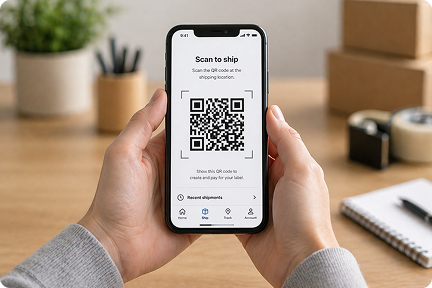
Bring your device to the shipping provider and show your QR code or digital label. No packing is needed. The carrier will package and ship your device for you.

Option 3: Shipping It Yourself

Pack and send your device using your own materials. If you choose this option, please follow the guidelines below to ensure your device arrives safely.

no image
Important

Proper packaging ensures your device arrives safely and prevents damage during shipping.

Self‑Shipping Instructions

If you are packing your device yourself, follow the steps below to securely prepare and ship it using the provided return option, helping ensure it is received and processed correctly.
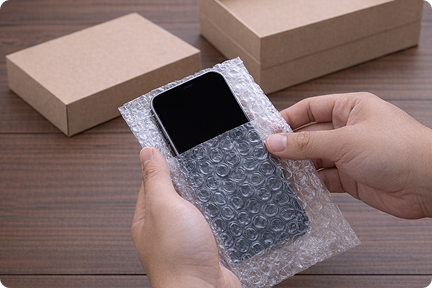
1 Use Protective Sleeve

Place your device in the protective sleeve to help prevent damage during transit.

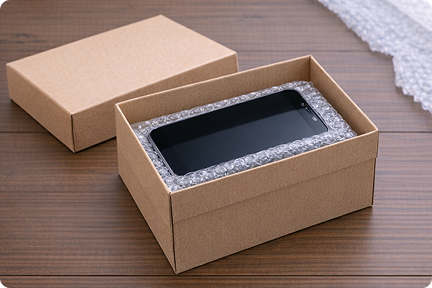
2 Secure Your Device for Shipping

Carefully pack your device so it stays securely in place inside the box or bubble envelope and is protected from damage during shipping.

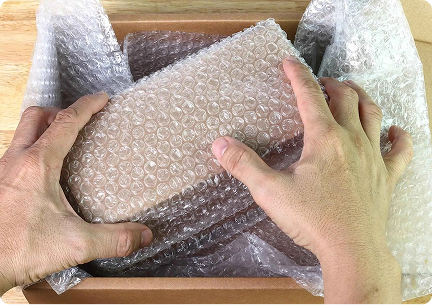
3 Add Protective Wrapping

Cushion your device with bubble wrap or protective materials so it stays in place during shipping.

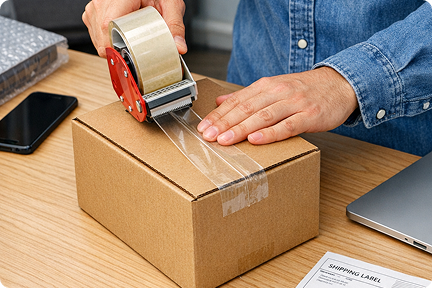
4 Seal the Box Securely

Close the box securely and seal all openings with the provided adhesive tape or sturdy packing tape to keep it sealed during shipping.

5 Attach Shipping Label

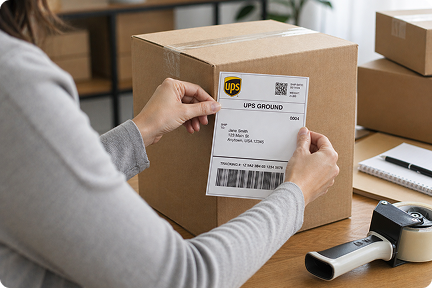
Attach the prepaid shipping label to the top of the package, making sure to cover any old labels or barcodes if you are reusing a box.

6 Prepare for QR Code (Digital Label)

Make sure you have your QR code/Digital Label available for shipping when dropping your package off at the Shipping Provider. They will handle the rest.